When using multiple cameras, the response of ComputeDisparityMap becomes very slow

Continuing the discussion from How to use a common hardware trigger with multiple cameras:

General Information

  • Product: C57-6-M
  • Serial Number: 244888, 245218
  • Ensenso SDK Version: 4.0.1502
  • Operating System: Windows 10 64bit
  • Data Attachments

Problem / Question

As in the code below, we open two C57 cameras, specify hardware triggers for each, execute the Trigger and Retrieve commands, and then execute the ComputeDisparityMap command.

	nxLibSetString(&error, "/Execute/Parameters/Cameras", m_serial);
	nxLibSetString(&error, "/Execute/Command", "Open");
	nxLibSetString(&error, "/Execute/Parameters/Cameras", m_serial2);
	nxLibSetString(&error, "/Execute/Command", "Open");
	nxLibSetString(&error, "/Execute/Parameters/Cameras", m_serial_C);
	nxLibSetString(&error, "/Execute/Command", "Open");
	nxLibWaitForType(&error, "/Execute/Command", NxLibItemTypeNull, 1);
	nxLibSetString(&error, "/Execute/Parameters/Cameras", m_serial_C2);
	nxLibSetString(&error, "/Execute/Command", "Open");
	nxLibWaitForType(&error, "/Execute/Command", NxLibItemTypeNull, 1);

	NxLibCommand trigger(cmdTrigger);
	trigger.parameters()[itmSubset] = valAll;
	trigger.execute();

	NxLibCommand retrieve(cmdRetrieve);
	retrieve.parameters()[itmTimeout] = -1;
	retrieve.parameters()[itmCameras][0] = m_serial;
	retrieve.parameters()[itmCameras][1] = m_serial2;
	retrieve.execute(static_cast<bool>(false));

	while (1) {
		std::this_thread::sleep_for(std::chrono::microseconds(10));
		if (retrieve.finished()) {
			retrieve.assertSuccessful();
			assert(retrieve.result()[m_serial][itmRetrieved].asBool());
			assert(retrieve.result()[m_serial2][itmRetrieved].asBool());
			bool rc2 = retrieve.result()[m_serial2][itmRetrieved].asBool();
			if (rc2) {
				break;
			}
		}
		if(cancel){
			retrieve.cancel();
			while (true) {
				if (retrieve.finished()) {
					return(1);
				}
			}
		}
	}
	retrieve.parameters()[itmTimeout] = 1000;
	retrieve.parameters()[itmCameras][0] = m_serial_C;
	retrieve.parameters()[itmCameras][1] = m_serial_C2;
	retrieve.execute();

	nxLibSetString(&error, "/Execute/Command", "ComputeDisparityMap");
	nxLibWaitForType(&error, "/Execute/Command", NxLibItemTypeNull, 1);

	nxLibSetString(&error, "/Execute/Command", "ComputePointMap");
	nxLibWaitForType(&error, "/Execute/Command", NxLibItemTypeNull, 1);
	//・・・

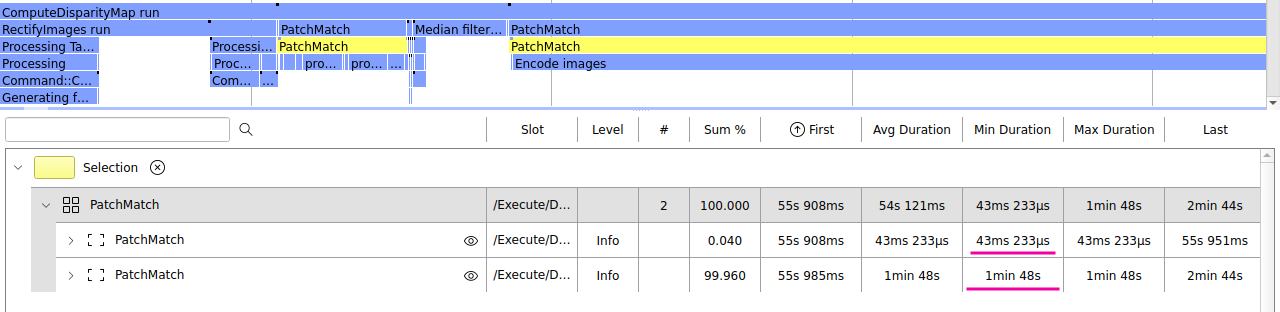
However, it takes more than a minute for the ComputeDisparityMap command to complete.

(We are waiting for a response with

nxLibWaitForType(&error, “/Execute/Command”, NxLibItemTypeNull, 1);)

Is there something wrong with how we are using it?

I am attaching the profile obtained at that time.

The single-camera version of the above code works normally.

Thank you in advance.

Best regards,
K.N,
Dear Techno,

We have never seen such strange behavior before. Note that the computation of the disparity map takes a very long time every second time. The first takes about 40 ms, and the second takes about one minute.

It would be helpful if you

  • record a file-camera,
  • check that the effect is reproducible for this file-camera,
  • share this file-camera with us.

Meanwhile, you can try updating to the next version of the SDK.

Best wishes,
Grisha

HI Grisha.

First, thanks a lot for your quick response!

The phenomenon is occurring constantly during the test,

20260427101210.enscam (24.9 MB)

and we have the filecamera generated at that time, so I am attaching it.

Could you please take a look?

Thank you very much.

Best regards,
K.N,

Dear Techno,

We tested both of your file-cameras on Linux, Windows 10, and Windows 11 and found no issues. Both calls of PatchMatch stereo-matching were processed in approximately the same amount of time. Here is an example from Windows 10.

In your profiling record, I noticed that not only did PatchMatch stereo matching start working very slowly, but the location cycle is also very unstable. I’m pretty sure there’s software on your computer that de-prioritizes processes with long-term, high CPU usage. It could be MS Defender, a firewall, or an antivirus program. Disable all of them, increase the priority of your process (e.g., in Task Manager), and take new measurements.

Were you able to reproduce the long delay with your file-cameras in NxView?

Best wishes,
Grisha

HI Grisha.

Thank you for your reply.

I apologize for the late reply.

I tested the two file cameras I sent using my custom software, but I was unable to reproduce the same phenomenon as you described at the site. Currently, I am unable to access the site for some time due to other reasons. The two cameras will arrive within a few days, and I will attempt to reproduce the issue in the office using a different PC than the one used at the site.

Also, I haven’t added any antivirus software since purchasing the PC. Therefore, the next time I’m able to work on-site, I’ll try disabling MS Defender and a firewall.

I will report back once I have received the two cameras and confirmed they are working correctly.

Incidentally, when capturing images on-site, we connected one sensor to both cameras as a hardware trigger. However, after one camera’s projector lit up, the other camera’s projector lit up 0.5 to 1.0 seconds later. Is this also something that can be confirmed with the profile I sent? Ideally, both cameras’ projectors should light up simultaneously, but is this timing difference also due to MS Defender or something similar?

One more question, please. In my custom software, I’ve set the same camera parameters for two cameras, as shown in the code below.

if (!selectfile.Open(LoadDlg.GetPathName(), CFile::modeRead | CFile::typeText)) {
	selectfile.Read((LPVOID)(&jsonbuf), sizeof(jsonbuf));
	selectfile.Close();
	sprintf_s(path, sizeof(path), "/Cameras/%s", m_serial);
	nxLibSetJson(&error, path, jsonbuf, NXLIBTRUE);
	sprintf_s(path, sizeof(path), "/Cameras/%s", m_serial2);
	nxLibSetJson(&error, path, jsonbuf, NXLIBTRUE);
}

These parameters were adjusted in NxView while Camera 1 was connected.

My question is:
By using the same parameters for Camera 2 as for Camera 1, am I inadvertently changing values ​​specific to Camera 2?

Could this be causing ComputeDisparityMap to slow down?

Thank you for your understanding.

Best regards,
K.N,

HI Grisha.

I was able to test it on a field PC, so I will report the results.

I don’t have any security software installed, so I disabled Windows Defender and Windows Firewall, but the problem persisted.
I also increased the priority in Task Manager, but the problem remained unchanged.

When I switch back to using only one camera, I can create parallax data normally.

For reference, the CPU of the problematic PC is

Intel(R) Core™ i7-9700TE CPU @ 1.80GHz.

The CPU of the PC that did not experience the problem

Intel(R) Core™ i9-10900K CPU @ 3.70GHz.

Is there anything else I should check?
Also, if I were to try upgrading the SDK version to see if it would help, which version should I upgrade to?
Thank you in advance for your help.

Best regards,
K.N,

p.s.

When I selected two cameras in NxView and activated the software trigger, I didn’t notice any significant decrease in processing speed. However, when using hardware triggering with FallingEdge, the projector LED lit up and it appeared to be captured, but the displayed image barely updated. I wasn’t sure if the capture or parallax data creation was actually happening. I’ve attached the JSON file configured in NxView.

cam1.json (17.0 KB)

cam2.json (17.0 KB)

color.json (5.5 KB)

Could there be an error in the function call?