General Information
- Product: e.g. N45-604-16-IR
- Serial Number: 229614
- Ensenso SDK Version: 4.3.880
- Operating System: Linux
Problem / Question
I want to hand-eye-calibrate the camera to my robot using ROS2 Humble.
I installed the NxLib according to ros_driver/docs/ROS2.md at master · ensenso/ros_driver · GitHub
Connecting the camera with “ros2 run ensenso_camera ensenso_camera_node” works fine “Opened camera with serial number ‘229614‘.
According to the docu (Making sure you're not a bot!) I need to launch the calibrate_handeye launch file like so:
roslaunch ensenso_camera \
    calbrate_hand_eye.launch \
    camera_serial:=<serial of camera> \
    robot_frame:=<tf frame of robot base> \
    wrist_frame:=<tf frame of pattern on the robot> \
    is_fixed:=true
With ros2 launch ensenso_camera I only see following launch files:

With ros2 run ensenso_camera I see following executables:

I assume I need to use ros2 run ensenso_camera calibrate_handeye which leaves me with the following error:
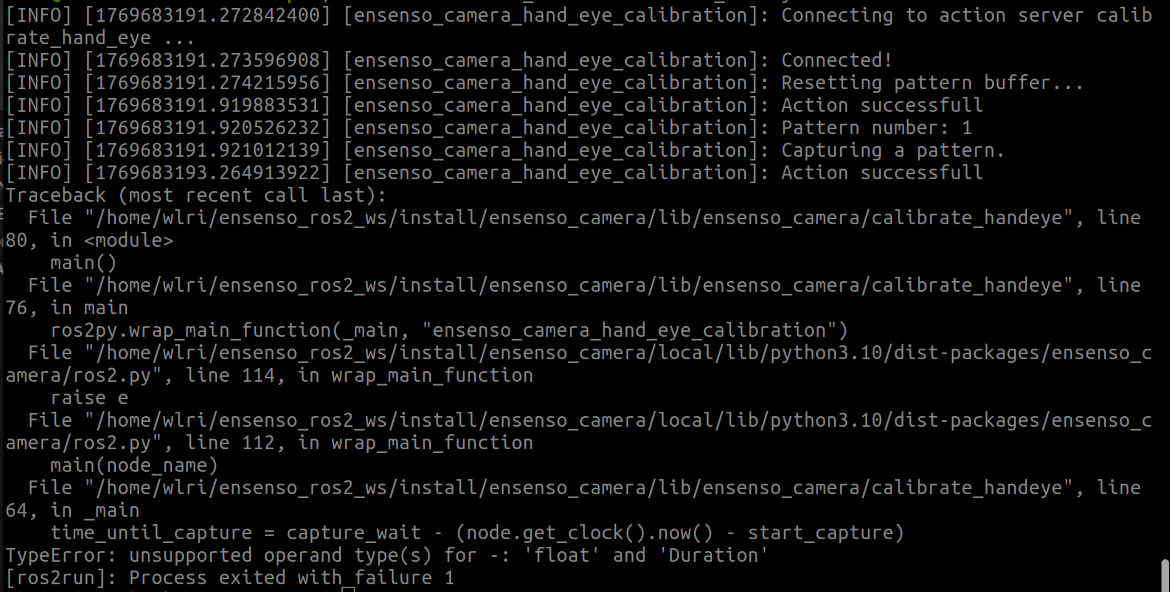
It seems there is a type mismatch?
Also, according to the manual (roslaunch … see above) I need to pass launch arguments, but how can I do that if I dont have a launch file called calbrate_hand_eye.launch in the ROS2 environment?