NxView startup error(0xc0000142)

General Information

  • Product: C57-6-M
  • Serial Number: 244888
  • Ensenso SDK Version: 4.0.1502
  • Operating System: Windows 10 64bit
  • Data Attachments?

Problem / Question

I installed Ensenso SDK Version: 4.0.1502 on a slightly older PC (Windows 10 64-bit).

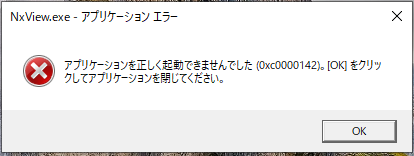
When I launched NxView, the above error screen appeared.

The message says,

“The application was unable to start correctly (0xc0000142). Click OK to close the application.” Can you tell me what the problem is?

Are there any items I should check?

Incidentally,

NxProfiler and NxTreeEdit can be launched without any error messages.

NxCalTab, like NxView, displays the error 0xc0000142 upon startup.

Best regards,
K.N,

We have seen this error code in the past when the CPU didn’t support the SSE4.1 and POPCNT instructions, which are required for running the NxLib. What CPU does your system have?

1 Like

Hi Daniel

First, thanks a lot for your quick response!

My CPU is old, so that might be the reason.

When I checked the Windows system properties, the CPU was displayed as follows:
“Intel(R) Core™ i3 CPU 550 @ 3.20GHz 3.19 GHz”

What do you think?

Best regards,
K.N,

I cannot find a specification from Intel for this specific CPU, but from other pages it seems like it does not support the required POPCNT instructions.

See the system requirements. Running the NxLib requires a CPU that supports SSE4.1 and POPCNT. Or ideally even AVX2.
Hi Daniel

Thank you for your response.

I understand the content.

I will select the PC to use based on the specifications you pointed out.

Thank you again.

Best regards,
K.N,