Product
C57-6-M
Serial Number
245413
EnsensoSDK Version
4.3.1057 4.0.1502
Device Firmware Version
2.0.151 1.3.32
Operating System
Windows 11 pro
Attachments? FileCamera, Profiler Log, Photo of Setup, Screenshots
Describe issue here
HI
Image acquisition via external trigger was not working correctly with SDK 4.3.1057 on a newly installed PC (Windows 11), so I downgraded to SDK 4.0.1502, which had operated stably on the old PC (Windows 10 Pro). (I uninstalled the new SDK and installed the old one, and also reverted the camera firmware from V2.0.151 to V1.3.32.)
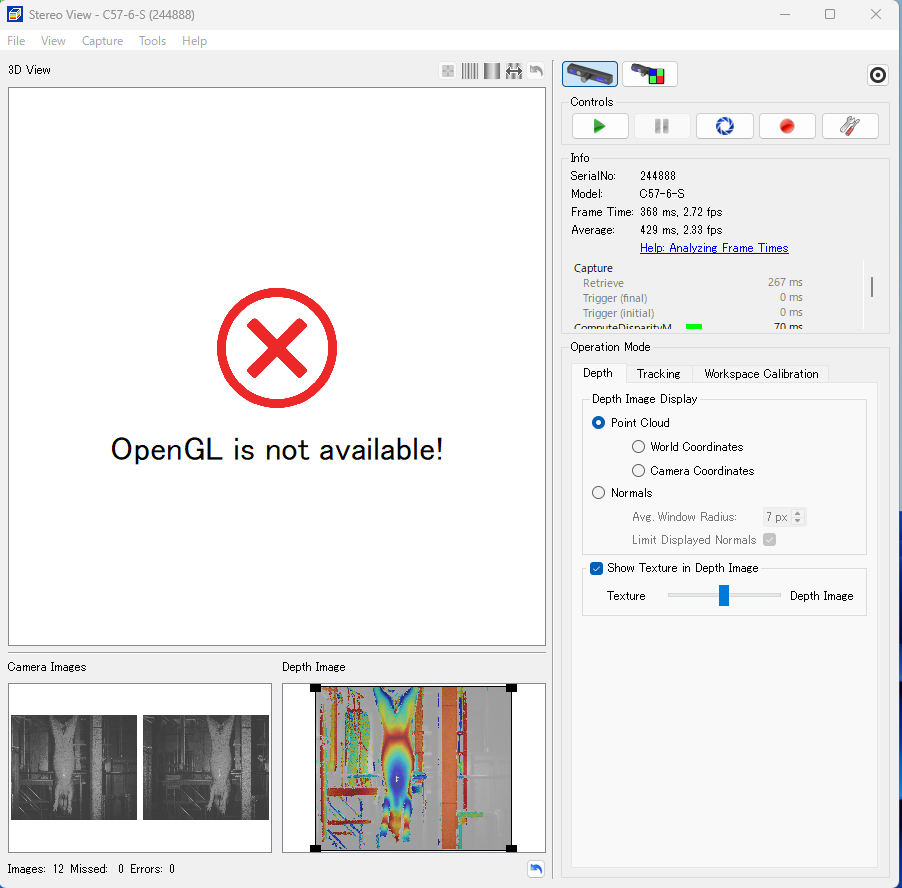
While image acquisition using my custom software appears to be working fine, the 3D View in NxView displays the error “OpenGL is not available!”
I do not recall having this issue with SDK 4.3.1057 (there were no anomalies then).
How can I resolve this problem?
Best regards,
K.N,