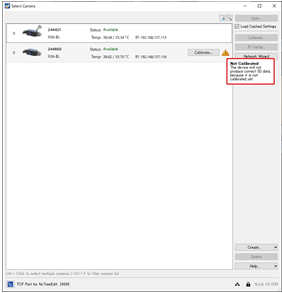
A customer asked the following question.
Camera: X36
NxLib:3.6.1590
After installing the camera I purchased (It should already be calibrated.), when I opened it in NxView, the message “Not Calibrated” was displayed on only this camera.
I have installed more than 10 cameras so far, but this is the first time this has happened.
I performed calibration and the message disappeared and I was able to start up, but I am concerned about the fact that it only occurred on this camera.
Can you guess what the cause is?
I also have similar experience, this “Not Calibrated” message may appear when the IP address is not yet set correctly after connecting the camera. After I set the IP address correctly, this message will disappear without having to recalibrate.
Do you think this is the same phenomena that happens at the customer or known issue?
Hi Kenzo, do you remember whether the camera was assigned with a valid IP address? What you’ve mentioned is correct. If the host is not able to read the calibration data from the camera (for example due to wrong IP setting) you’ll get the information that the camera needs calibration. - But if the IP setting is wrong, it is not possible to open the camera in the calibration wizard anyway. Setting a correct IP address is the first action.
when the IP configuration is wrong the calibration can not be read. But in that case NxView should show the warning about an incorrect IP configuration first. It might be possible that after correcting the IP configuration you see the calibration warning for a few seconds while the calibration gets read in the background.
Since the screenshot does not show a problem with the IP configuration the calibration should have been read in the customer’s case.
It is possible that there was a problem with the cached EEPROM content on the PC or that the calibration was actually corrupted in the EEPROM. But after you recalibrated it already we cannot really investigate that anymore.
The actual EEPROM being corrupted and then working normally afterwards is very unlikely. With the cache there have been some bugs in the past, so that’s probably what happened. In that case it might have actually been fixed by simply deleting the cache file.