Iam trying to do multi camera calibration with two ensenso C57 camera . for now i have saved camera file for testing . Is it possible to do multi camera calibration in Nxlib in saved camera file . Also workspace calibration in Nxlib sdk . After the calibration how do i get merged depth or colordepointcloud as pcd format . Can i able to capture
the same NxLib commands used to calibrate real cameras can be used on file cameras as well. Please check out our guides on camera calibration and workspace calibration for details and code examples.
Should you have any further questions, please do not hesitate to ask.
I did the multi camera setup and its linked to one camera to another . how do i capture merged pcd and save it as one single pcd . From Nxlib Its difficult to see the merged data and save it . How can I do that ?
Could you please clarify exactly what you want? Here are two possible interpretations I can offer an answer to:
An unstructured point cloud containing the matched 3D points from multiple cameras
This is currently not possible. You can use SaveImage and save one PCD for each camera’s point map and merge them afterwards. Or you can use SaveModel with the PointCloud parameter, but that currently only works for PLY files, although we are in the process of extending it to PCD (issue #6285).
A structured point map containing the matched 3D points from multiple cameras
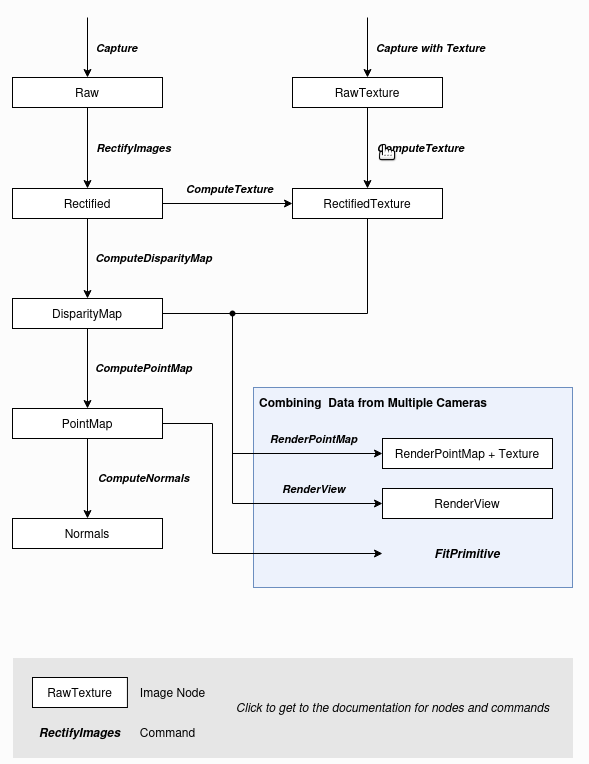
This can be achieved by saving the result of the RenderPointMap command.
I have two c57 camera here . these two calibrated by link calibration stereo of one camera is linked to another . in SDk i could see the mesh . i would like same mesh in merged format as pcd ?
This is not possible with the current release, but I have send you a download link for a preview which implements PCD output for the SaveModel command, which I expect to give you what you are looking for.
If the preview does not solve your issue or if you have any further questions, please let me know.
since i have doen this calibration with two c57 camera how do i restore its original parameter . means its link to right camera frame itself. currently lt linked to its own frame can you ploease help me on this . any API command . im trying to set from my c++ node.
This sets the specified camera’s link to an identity transformation with target “”.
The link is only changed temporarily while the camera remains open and will be lost if the camera is closed or disconnected. To store the link permanently on the camera, you need to then use the StoreCalibration command:
Is it possbile to get in one camera frame lets say right calibrated to left c57 cameras if i call renderpointmap keeping base_frame as left can it be done merged format and also when i did i see an offset in z of 1cm after linking . can you tell me how to validate the calibration right or wrong too
Please excuse me, but I am really not sure what you mean here. If the following does not answer your question, please try to rephrase it.
When you say “right calibrated to left c57 cameras”, I am assuming you have one C57 on the left and one C57 on the right side of your working volume. If instead you mean the right and left monocular cameras that make up the C57 stereo camera, please correct me.
You can set the link between the cameras such that the right C57 stereo camera is linked to the left C57. When performing a link calibration using the Calibrate command, all cameras are linked to the first camera given in the Cameras parameter, as is documented there.
After link calibration, your point maps should align and, if you have reset the link of the left C57 as described above, will now be relative to the left C57.
If you want the point maps coordinates to be relative to your workspace, which I guess you call base_frame, you would then usually link the left C57 to your worksapce using the CalibrateWorkspace command as explained in our guide on worksapce calibration.
Either way, when you call RenderPointMap on both cameras after link calibration, the result will contain the combined depth information from both cameras. If you want the result of RenderPointMap to be rendered from the left C57 point of view, you can specify the left C57 serial number in the Camera parameter (not Cameras, note the singular).
Please check out the guide on checking camera calibrations in our manual. It explains how you can evaluate the accuracy of the intrisic calibration of each individual camera and of the link calibration between the cameras, either using NxView or in your own application.
This is the scenario . After multi camera link calibration. keeping left camera as reference as “left” can i get merged pointcloud by triggering camera both left c57 and right c57 and calling *RenderPointMap".
Once you have calibrated the link between the left C57 and the right C57, triggered both and computed a point map for both, you can combine the two point maps using RenderPointMap.
I still do not quite understand what you mean by “keeping left camera as reference as “left””.
If you want the combined point map from the perspective of the left C57, you must give its serial number in the Camera parameter.
If you want all point maps to be relative to the left C57, clear the left camera’s link like I explained above.
If this does not answer your question, please explain your question to me again in more detail and also refer to our guide on multi camera setups.
I can do this . This is what i meant keeping left c57 camera as base_frame something like that with this Left c57 camera perspective im trying to combine
what will be the average error when I do this multi camera calibration assuming i followed all steps correctly and calibrated correctly? Can you please help me on this ?